 varingblaar
Xteink X4
Born from Obscurity
About 6 months ago I was browsing r/ereader, you know, as you do... And spotted a post about this little reader. The name refers to the screen size: 4.3 inch corner-to-corner. So this is a tiny black and white e-ink reader with epub support that weighs 74g. That sounds ideal for me! After doing a little research about what it can do, I took the plunge and ordered one.
The Good
It's small enough to slip in my pocket and I forget it's there, but large enough to read comfortably. It weighs 75g, so I don't even feel it in my pocket.
The reason I take forever to finish a book is that I don't make time to read. Sometimes I drag my (comparatively) big 8 inch reader along, but most of the time I only read at home, and that involves a decision to sit down for a few minutes while there's always something that needs doing. This little guy solves the problem. It's in my pocket and it turns on super quick. When I have to wait for something, I ask myself "do I grab my phone or my book?" In most cases I grab the little reader.
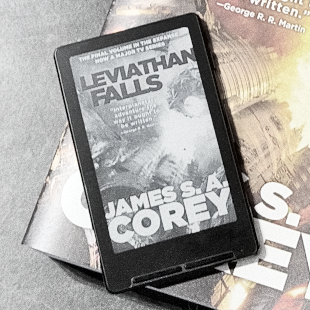
A positive for me, there's no store. No ads. No logins. No data being shared. No distractions. Just book on device, read. I can see this being a negative for many people. There's a convenience to Kindle or Kobo. Click buy, book appears. Personally, I prefer keeping my own copies of books. You'll notice in the polaroid above, the little reader is resting on a printed copy of the same book.
The battery life on this thing in insane. Of course it's e-ink so it only uses battery when the screen changes. When it's turned off it uses practically zero power, except to monitor the power button. I charge it so seldom, I forget when last I charged it! When reading at home, if I see the battery is below 30%, I just pop it on a charger for half an hour and it's fine for a month.
Because the little reader is based on a pretty standard board, the ESP-32, the community has written their own firmware for it. This sounds super complicated, but really you just connect it to your laptop, push a few buttons and it replaces the original software with a custom built version that offers a better reading experience. It was a fine reader before, and did what it needed to do, but Crosspoint made this little reader absolutely special. There's a catch though. We'll get to that...
It has magsafe on the back. The only thing I use it for, is to clip it onto the official flip case. But it was a big part of their marketing when the device was launched and is worth mentioning. It's in a bit of an odd spot, though. More below.
The Bad
E-ink is fragile and this thing is small. To keep it light and portable, there's not a lot of protection around the screen. Covers, and sleeves help, but if it gets poked in the wrong spot by something in you pocket, it's dead. Xteink is a relatively small company. The cult following this little reader has, is putting a lot of strain on their ability to meet demand. The faster you build, the more likely mistakes happen. Many people have had their screen broken before it arrives, and after sale support is slow to respond.
You have to find your own books. As mentioned above, for me this is a good thing. But the process of getting the book, getting the little reader connected, and sending the file over is a slow and unnecessary process when my Kobo just has the book immediately.
No light. This is a divisive opinion in the community. E-ink doesn't shine through, so you can't use a backlight. The light has to be in front and shine from the sides. The moment you design that, the device becomes thicker and there's a gap between the display surface and the surface of the device. Personally I don't need a light because I read wherever I would read a physical book. For many, however, the lack of a built-in light and the honestly terrible "official reading light" is a deal breaker.
The button placement is... interesting. On the right side is a power button and a volume rocker, much like a phone. The volume rocker is previous/next. On the front are two rockers, left is back/confirm and right is previous/next. You can switch these around when reading RTL. It took me a while to figure out how to hold the little reader so my finger rests on the buttons, especially because I habitually hold a book or device with my left hand. Sometimes I still page back accidentally. Often I cradle the little reader in both hands much like a traditional book but smaller, and use the front buttons. That seems to work best.
The magsafe is in a weird spot. For most phones it sits too high, covering the camera. Others have found attaching it upside down is better. Just worth a mention. I don't use it much.
The Ugly
A couple days ago of this writing, reports started popping up of devices that don't register when connected to a computer, meaning custom firmware can't be loaded. This doesn't make the little reader useless, but definitely makes it less cool.
Information is sparse and no official statement has been made, but based on anecdotal messages from employees at Xteink, the change seems limited to devices made for the Chinese market, not the international version. Most likely the plan is to prevent international customers from buying the more affordable Chinese language device and switching it to English (or custom) firmware. Proper communication towards customers would've helped a lot to prevent this minor panic and we're still waiting for final word on which devices will be affected in future. This does show that Xteink can and will make hardware level changes, and only clarify when it is discovered by paying customers. It doesn't sit well with me.
Compared to X3
So there's an even smaller version, called the Xteink X3. As the name would suggest, it's slightly smaller. 3.7 inch, so actually half an inch difference. The newer screen has 20% more pixels. The magsafe is in a better spot so it'll stick to more phones more often I guess. Supposedly it has an RTC chip, so it can keep track of time, something the X4 can't do.
Something nobody seems to mention, but that I think is a big deal, is that the buttons around the sides are better placed. Power button at the top, and next/previous on either side. So you're pushing the edge of the direction in which you want to page. It's also slightly higher up on the device, which I think is great. Haven't held one in my own hands, so not sure, but it looks promising.
Certain things are debatable. They advertise NFC but it doesn't do anything yet. It has a gyro so you can tilt the device to turn the page, which seems annoying to me, but others seem to like it. Also for people with mobility issues it could be very handy.
Also the charger. It's pogo pins. The device isn't thick enough for a Type-C port, and these chargers have become pretty standard as an alternative. Many smart watches use them, and besides the included cable you can buy a little Type-C adaptor. The battery lasts so long, you'll have time to find that cable when the day come to charge.
Overall
I know there's a lot of hype about this little thing, but the X4 has genuinely become my main reader. The Boox is gathering dust in a drawer and the Kobo I've lent to a friend. I'm tempted to order a second one, once we have clarity on these locked units, and then leave it in storage as a backup.
Hopefully this is the start of a "tiny reader" niche similar to the "retro handheld" niche over the last few years.